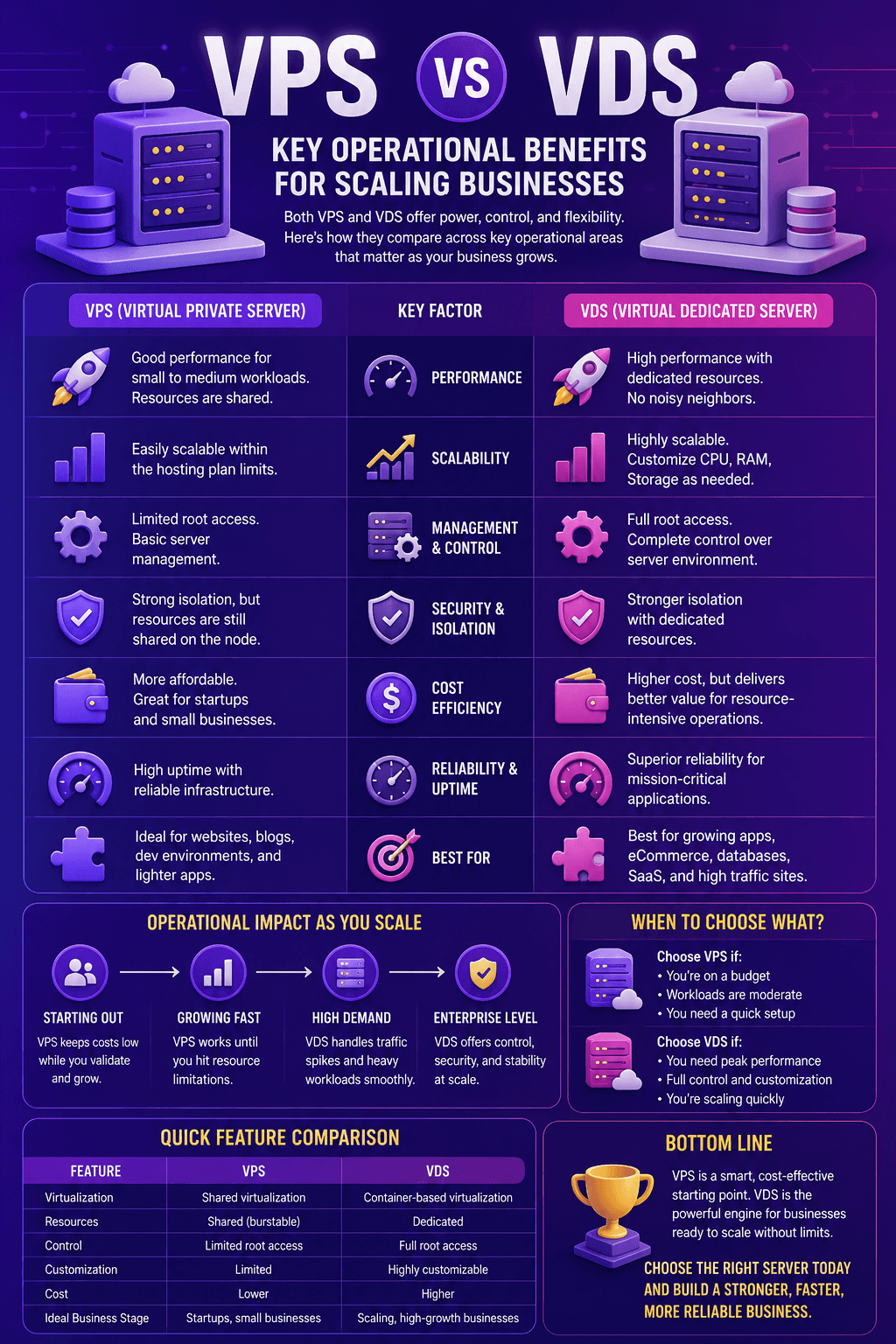
VPS vs VDS: Key Operational Benefits for Scaling Businesses
A server that is fast sometimes costs more than one that is steady always. Here is what VPS vs VDS really means for a scaling business.

The hosting decision that matters least when you have fifty customers becomes one of the more consequential ones when you have five thousand. Not because the technology changed, but because the failure modes did. At small scale, a slow server is an annoyance someone eventually gets around to investigating. At scale, the same slowness is a support ticket queue, a churn number, and an engineering afternoon nobody planned for.
Most VPS versus VDS comparisons are written for the first situation and read by people in the second. They compare specifications and pricing tiers while ignoring the operational questions that actually determine cost as a business grows: how predictable is performance under load, how quickly can capacity be added without a migration, and how much of your team’s time does the infrastructure quietly consume every month.
This guide covers those questions specifically. It also addresses something most comparisons skip entirely, which is that the terms themselves are not standardized, and shopping by label rather than by architecture is how growing businesses end up paying premium prices for the product they already had.
Table of contents
- VPS vs VDS: Quick Answer
- The Terminology Problem Worth Understanding First
- Why Predictability Beats Peak Performance at Scale
- Comparing the Operational Dimensions That Actually Matter
- Calculate the Real Cost of VPS and VDS Hosting
- The Scaling Mechanics That Determine Operational Cost
- When Should a Business Upgrade or Migrate?
- Where Compliance and Geography Enter the Decision
- Does a VDS Automatically Provide Better Security?
- VPS and VDS Provider Evaluation Checklist
- Making the Decision at Different Growth Stages
- VPS vs VDS for Business: Common Questions
VPS vs VDS: Quick Answer
A VPS and a VDS are both virtual servers running on physical infrastructure. The difference usually comes down to how the hosting provider allocates and guarantees resources.
A VPS is commonly sold with shared or overcommittable CPU capacity, making it affordable and flexible for moderate workloads. A VDS is commonly positioned as a virtual server with reserved CPU, memory, or storage resources, providing more predictable performance under sustained demand.
These definitions are not standardized. Some VPS products include guaranteed resources, while others still share physical storage, network capacity, and underlying hardware. The product name alone is therefore not enough to make a reliable decision.
| Area | VPS, common usage | VDS, common usage | What to verify |
|---|---|---|---|
| CPU | Shared or overcommittable vCPU | Reserved vCPU or dedicated cores | Whether CPU is pinned, reserved, capped, or subject to contention |
| Memory | Allocated RAM, sometimes with provider-specific limits | Usually reserved RAM | Whether ballooning or memory overcommitment is used |
| Virtualization | May use containers, KVM, Xen, or another platform | Often uses full virtualization | Hypervisor type and resource policy |
| Storage | Capacity allocated on shared storage | Capacity may be reserved, but the storage system can still be shared | IOPS, throughput, latency, and throttling limits |
| Performance | Cost-effective, but may vary under host contention | Usually more consistent under sustained load | Service limits and overselling policy |
| Scaling | Often easy to resize within the provider’s available tiers | Also scalable, although dedicated allocations may limit available upgrades | Maximum instance size, downtime, and migration requirements |
| Best fit | Development, smaller websites, moderate applications, and variable workloads | Databases, high-traffic applications, latency-sensitive systems, and sustained workloads | Actual application profile and business risk |
| Cost | Usually lower | Usually higher | Complete operational cost, not only the advertised plan price |
The practical VPS versus VDS difference is not the acronym. It is the combination of resource guarantees, virtualization architecture, storage performance, network limits, provider support, and scaling options.
The Terminology Problem Worth Understanding First
There is no governing body enforcing what VPS and VDS mean, and providers use them inconsistently enough that the labels carry less information than most buyers assume.
Where providers distinguish between the terms, VPS commonly describes a virtual server with resources allocated from shared infrastructure, while VDS commonly describes a virtual server with more strongly reserved CPU, memory, or storage capacity.
Both products remain virtual machines running on physical infrastructure that may host other customers. A VDS does not necessarily include dedicated physical storage, exclusive network capacity, or an entire physical server. The provider’s written resource guarantees are more reliable than the product name.
In practice, virtualization technology and resource-allocation policies matter more than the acronym in the product name. KVM provides hardware-assisted virtualization and gives each guest its own operating system kernel, but it does not automatically guarantee dedicated CPU cores, uncontended storage, or zero oversubscription.
Buyers should verify whether CPU resources are shared or reserved, whether RAM is guaranteed, whether storage performance is limited, and whether the provider oversells capacity. These details reveal more about the service than the VPS or VDS label.
For a scaling business, this matters practically rather than academically. Procurement teams comparing quotes across providers are frequently comparing different things under identical names, or identical things under different ones, and the only way through is asking about virtualization and overselling directly.
Why Predictability Beats Peak Performance at Scale
Here is the operational insight that separates infrastructure decisions made by growing businesses from those made by hobbyists: consistency is worth more than speed.
A server that responds in 80 milliseconds most of the time and 900 milliseconds during someone else’s traffic spike is operationally worse than one that reliably responds in 200 milliseconds, even though the first has better average performance. Variable performance generates support tickets, triggers false alarms in monitoring, complicates capacity planning, and makes it genuinely difficult to distinguish a real problem from a noisy neighbor.
This is the noisy neighbor problem, and it is the primary operational argument for guaranteed resource allocation. When another tenant on your physical host runs a heavy batch job, an oversold environment lets their workload consume capacity you assumed was yours. Your application slows for reasons entirely outside your visibility or control, and your team spends hours investigating a problem that exists on someone else’s account.
The economics of that unpredictability become substantial as an organization grows. Uptime Institute’s 8th Annual Outage Analysis found that 57 percent of organizations reported their most recent significant outage cost more than $100,000, with one in five reporting costs exceeding $1 million for the second consecutive year. The report also notes that while per-site outage rates have declined for five straight years, the pace of improvement has slowed while external infrastructure failures and connectivity issues have become more prominent in publicly reported incidents.
Not every performance degradation is an outage, but the relationship holds. The infrastructure conditions that produce unpredictable slowdowns are frequently the same ones that eventually produce genuine downtime, and both scale in cost with the size of the business absorbing them.
Comparing the Operational Dimensions That Actually Matter
Specification comparisons are readily available. What follows is a comparison of the operational characteristics that determine cost and effort as a business grows.
| Operational Factor | Oversold VPS | Guaranteed Allocation VPS/VDS | Business Impact |
|---|---|---|---|
| Performance consistency | Variable under neighbor load | Predictable regardless of neighbors | Support ticket volume, monitoring noise |
| Capacity planning accuracy | Difficult, baseline shifts | Reliable, baseline stable | Forecasting confidence, budget accuracy |
| Vertical scaling speed | Minutes to hours | Minutes to hours | Response time to demand spikes |
| Migration requirement to grow | Often at upper tiers | Less frequent | Engineering hours, planned downtime |
| Troubleshooting complexity | High, external variables | Lower, contained to your stack | Time to resolution, team morale |
| Monthly cost predictability | Low base cost, hidden variance | Higher base cost, stable | Financial planning accuracy |
| Compliance suitability | Weaker isolation claims | Stronger isolation posture | Audit readiness, contract eligibility |
| Team time consumed | Higher, unpredictable | Lower, plannable | Opportunity cost of engineering focus |
Calculate the Real Cost of VPS and VDS Hosting
The monthly hosting fee is only one part of infrastructure cost. A less expensive VPS can become the more costly option if inconsistent performance creates support work, engineering investigation, failed deployments, or avoidable downtime.
A practical calculation is:
Monthly hosting TCO = server plan + backups + monitoring + security services + software licenses + bandwidth and egress + administration time + expected incident cost
The expected incident cost can be estimated using:
Incident cost = incident frequency × average recovery time × estimated cost per hour
This does not require perfect numbers. Even approximate figures make the decision more useful than comparing plan prices alone.
Infrastructure should also be included when estimating the broader cost of operating a business website. The cheapest plan is not automatically the most economical one, just as the most expensive plan is not automatically the most reliable.
Compare options using the same workload, support level, backup policy, monitoring coverage, and recovery expectations. Otherwise, the comparison mixes products that solve different operational problems.
The row that most often gets overlooked in procurement discussions is the last one. Engineering time spent diagnosing infrastructure inconsistency is time not spent building product, and at growth stage that opportunity cost frequently exceeds the price difference between hosting tiers by a wide margin.
The Scaling Mechanics That Determine Operational Cost
How a hosting product handles growth matters more than where it starts, and this is where virtual servers hold a genuine structural advantage over both shared hosting below them and dedicated hardware above them.
Vertical scaling on a virtual server typically means adding vCPU, RAM, or storage to an existing instance, often with a brief reboot rather than a migration. That is operationally cheap: no data transfer, no DNS changes, no coordination window, no risk of configuration drift between old and new environments. A business experiencing steady growth can move up tiers repeatedly without ever performing a genuine migration, which is a substantial difference from the shared hosting-to-dedicated-server path, where growth eventually forces a disruptive move.
The limit is the physical host. Every virtual server sits on hardware with finite capacity, and once your instance approaches the practical maximum of what a single node can allocate, further growth requires either horizontal scaling across multiple servers or a move to dedicated hardware. Knowing where that ceiling sits with your specific provider before you approach it prevents an unpleasant discovery during a growth spurt.
Horizontal scaling, meaning distributing load across multiple smaller instances rather than growing one large one, is often the better architecture for genuinely scaling businesses even though it introduces complexity. Multiple modest servers behind a load balancer provide redundancy that a single large server cannot, so a hardware failure degrades service rather than eliminating it. The tradeoff is that your application must be designed to run statelessly across instances, which is an architectural decision better made early than retrofitted under pressure.
Efficiency at the application layer also affects how far a given server takes you, and this frequently gets ignored in favor of buying more capacity. The same discipline that applies to AI-powered development still requiring genuine human expertise applies to infrastructure decisions: tooling accelerates execution, but architectural judgment about what to build and how to structure it remains the determining factor in whether a system scales gracefully or expensively.
When Should a Business Upgrade or Migrate?
Traffic volume alone is not a reliable trigger for migration. A well-cached website can handle significant traffic on modest infrastructure, while a database-heavy application can struggle with a much smaller audience.
Build a performance baseline and investigate the following signals:
- Sustained CPU saturation, throttling, or elevated CPU steal time.
- Rising p95 or p99 response times without a corresponding application change.
- Persistent storage latency or I/O wait.
- Repeated memory pressure, swapping, or out-of-memory events.
- Network throughput reaching the provider’s documented limits.
- Slowdowns that correlate with host contention rather than application demand.
- Engineering and support time spent repeatedly investigating infrastructure variance.
- Backup or restore times that no longer meet recovery objectives.
- An approaching limit on the largest instance available from the provider.
- Availability requirements that a single virtual server cannot satisfy.
Before buying more capacity, confirm the application isn’t wasting the resources it already has. Caching, database indexing, background job queues, image optimization, and request controls can postpone an infrastructure upgrade. On Magento stores, warehouse scanning that writes to the database on every beep is a common hidden cause of peak-hour lock waits, and non-blocking Magento barcode verification often fixes it without a server upgrade.
For API-heavy applications, properly configured API throttling and rate limits can prevent sudden request bursts from exhausting server resources.
Tie the upgrade decision to sustained measurements and business impact, not a single traffic spike or isolated benchmark.
Where Compliance and Geography Enter the Decision
For businesses selling to enterprise customers or operating in regulated sectors, hosting architecture stops being purely an operational question and becomes a contractual one.
Enterprise procurement processes and security questionnaires increasingly ask specific questions about tenant isolation, data residency, and infrastructure control. A hosting arrangement with genuine hardware-level isolation through KVM virtualization produces better answers than one built on shared-kernel containerization, and those answers can determine deal eligibility rather than merely influencing preference.
Geographic placement carries similar weight. Data residency requirements are legal obligations in many jurisdictions rather than preferences, and a provider offering multiple regional locations lets a growing business serve customers in different regulatory environments without fragmenting across multiple vendors. For businesses expanding internationally, this becomes a genuine operational constraint, and the compliance considerations involved in expanding a business into new markets frequently include where customer data physically resides alongside the more familiar questions of hiring and entity structure.
The practical advice is to establish these requirements before they become urgent. Migrating infrastructure to satisfy a compliance requirement discovered during a late-stage enterprise sales cycle is considerably more expensive and stressful than provisioning correctly from the start.
Does a VDS Automatically Provide Better Security?
Dedicated or reserved resources can reduce performance contention and improve isolation claims, but a VDS is not automatically secure. Virtualization architecture is only one layer of the security model.
Security also depends on:
- Hypervisor maintenance and provider security.
- Operating system updates and vulnerability management.
- Administrator access controls and multifactor authentication.
- SSH configuration and firewall rules.
- Backup encryption and restoration testing.
- Network segmentation.
- Logging, monitoring, and alerting.
- DDoS protection.
- Application security.
- Incident response procedures.
The managed or unmanaged service model matters just as much. With an unmanaged VPS or VDS, the customer may be responsible for operating system patches, firewall configuration, backups, monitoring, malware response, and application security. A managed plan may include some of these responsibilities, but the exact scope must be documented.
Businesses should evaluate infrastructure security as part of a broader DevSecOps review, particularly when customer data or production applications are involved.
Compliance also depends on more than virtualization. Relevant factors can include provider certifications, contracts, data processing terms, encryption, access logging, backup locations, incident notification, data residency, and documented responsibility between the customer and provider.
VPS and VDS Provider Evaluation Checklist
A plan comparison should document the following answers before a business commits to a provider.
| Question | Why it matters | Evidence to request |
|---|---|---|
| Are CPU resources shared, capped, reserved, or pinned? | Determines performance consistency under sustained load | Written allocation policy |
| Does the provider oversell CPU or memory? | Reveals potential contention | Direct written response |
| Which hypervisor is used? | Affects isolation, operating system flexibility, and management | Platform documentation |
| Are storage IOPS and throughput limited? | NVMe branding alone does not guarantee storage performance | Documented performance limits |
| What are the network limits? | Port speed may differ from sustained throughput | Bandwidth, transfer, and egress terms |
| What is the maximum instance size? | Shows how far vertical scaling can continue | Regional plan list |
| Does resizing require downtime? | Affects operational planning | Resize procedure and expected duration |
| Are backups included? | Snapshots and backups are not always equivalent | Retention, location, and restore policy |
| What are the RPO and RTO? | Determines acceptable data loss and recovery time | Contract or service documentation |
| Is DDoS protection included? | Protection levels vary substantially | Covered attack types and mitigation limits |
| What does the SLA exclude? | Advertised uptime may not cover every service component | Full SLA terms |
| Is the service managed or unmanaged? | Establishes responsibility for patching, monitoring, and recovery | Responsibility matrix |
| Where will data and backups reside? | Affects latency, contracts, and regulatory obligations | Region and data processing terms |
| How is support escalated? | Fast first responses are not the same as fast resolutions | Support tiers and escalation process |
| Can the server be exported or migrated? | Reduces provider lock-in | Image export and migration policy |
Applying the Checklist to a Hosting Provider
When evaluating a provider such as HIP.Hosting, begin with its published virtualization, storage, server location, and resource information. Then request clarification about CPU allocation, overselling, network limits, backup retention, upgrade downtime, support responsibilities, and the largest available instance.
The purpose is not to judge a service by whether it is called VPS or VDS. It is to confirm whether the underlying architecture, guarantees, and support model match the workload your business needs to run.
A reliable provider should answer these questions clearly. A vague answer is itself useful information during evaluation.
Making the Decision at Different Growth Stages
The right answer genuinely differs by stage, and applying a single recommendation across all of them produces either overspending or fragility.
Early-stage businesses with modest, predictable traffic are often well served by a standard virtual server without guaranteed allocation, because the cost savings are real and the consequences of occasional variance are minimal. A brief slowdown affecting a handful of users is a genuinely different problem than one affecting thousands.
Growth-stage businesses, where traffic has become substantial and support burden translates directly into cost, are where guaranteed resource allocation begins to justify its premium clearly. The calculation shifts once engineering time spent on infrastructure inconsistency exceeds the price difference between tiers, and that crossover arrives earlier than most teams expect because the time cost is diffuse and rarely tracked.
Established businesses with regulatory obligations, enterprise customers, or genuinely high traffic volumes are typically past the point where the comparison is meaningful. At that stage the question becomes whether virtual infrastructure remains appropriate at all, or whether dedicated hardware, a hybrid arrangement, or a multi-region architecture better matches the operational profile. What does not change is the underlying principle that predictability, not peak specification, is what infrastructure spending at scale is genuinely buying.
VPS vs VDS for Business: Common Questions
There is no universally enforced definition, which is why comparing product names across providers produces confusion. Where a distinction is observed, VDS typically means fully dedicated resources with no overselling, while VPS may involve shared or oversold capacity among tenants on the same physical host. The more reliable indicators are virtualization technology, with KVM providing genuine hardware-level isolation, and the provider’s explicit overselling policy. Many providers use the terms interchangeably or list them as a single category, so asking about architecture directly matters far more than comparing labels.
The practical trigger is usually when performance variance starts generating measurable business cost, meaning support tickets, customer complaints, or engineering time spent investigating slowdowns. Traffic volume alone is a poor signal because a lightweight site handles substantial traffic on modest infrastructure while a database-heavy application strains under much less. A more useful test is whether you have ever been unable to explain a slowdown using data available to you, since that inability is characteristic of shared environments and it does not improve with growth.
It depends on what unpredictability costs your specific business. For an early-stage company with modest traffic, occasional variance is a minor annoyance and the savings are real. For a growth-stage business where slowdowns generate support volume and engineering investigation time, the calculation typically flips, because diffuse time costs accumulate faster than most teams track. The crossover point arrives when engineering hours spent on infrastructure inconsistency exceed the monthly price difference between tiers, which happens earlier than most teams expect.
Vertical scaling, meaning adding vCPU, RAM, or storage to an existing instance, is typically fast and requires only a brief reboot rather than a full migration, which is a substantial operational advantage over the shared to dedicated hosting path. The constraint is the physical host, since every virtual server sits on hardware with finite capacity. Once an instance approaches the practical maximum a single node can allocate, further growth requires horizontal scaling across multiple servers or a move to dedicated hardware, so knowing where that ceiling sits with your provider prevents surprises during growth.
Increasingly yes. Enterprise procurement processes and security questionnaires commonly ask specific questions about tenant isolation, data residency, and infrastructure control. Genuine hardware-level isolation through KVM virtualization produces stronger answers than shared-kernel containerization, and in some cases those answers determine deal eligibility rather than simply influencing preference. Geographic placement matters similarly, since data residency requirements are legal obligations in many jurisdictions rather than preferences.
Ask whether resources are oversold, what virtualization technology is used, whether storage is NVMe or SATA, what the largest available instance is in your chosen location, which regional locations are offered, and what support response times look like in practice. These six questions reveal considerably more about the operational experience you will actually have than any specification table, and a provider that answers all of them clearly has demonstrated something meaningful about how they operate.
Infographic