Best AI Lip Sync Generators 2026: 6 Tools for Realistic Talking Videos
Which AI lip sync tool fits real footage, avatars or API work, what free tiers actually give you, and the EU labelling rules now in force.
There is no single best AI lip sync generator, and any article that names one without asking what footage you have is selling something.
The tools split along one line that decides everything else: whether you are starting with real recorded video of a person, a still photograph, or nothing but a script. Those are three different technical problems that happen to share a product category. A model tuned to animate a photograph will not necessarily handle a moving camera. A platform built around avatars may be worse at real footage than a smaller tool that does nothing else.
Two things changed in 2026. Open-source lip sync closed enough of the quality gap that self-hosting became a real option for teams with volume. And on 2 August 2026, EU transparency rules took effect that require synthetic video depicting a real-looking person to be labelled, which moved disclosure from a brand decision to a compliance requirement for anyone with European viewers.
This guide covers what each tool is actually built for, what the free tiers really give you, how to test them on your own material in twenty minutes, and what you now have to disclose.
Table of contents
- Start With the Question That Decides Everything
- Real Footage: Changing What Someone Already Said
- Talking Photos: Making a Still Image Speak
- Avatars: When You Have a Script and No Footage
- Multi-Model Studios
- AI Lip Sync Tools Compared
- Open Source: The Option Most Roundups Skip
- What the Free Tiers Actually Give You
- What You Now Have to Disclose When You Publish
- A Twenty-Minute Test That Beats Any Comparison Table
- Where AI Lip Sync Still Breaks
- When AI Dubbing Pays For Itself
- Nobody Should Publish This Output Unreviewed
- Does AI-Generated Video Hurt Your Search Visibility?
- Frequently Asked Questions About AI Lip Sync Generators
- The Short Version
Start With the Question That Decides Everything
Before comparing features, answer this: what is your source material?
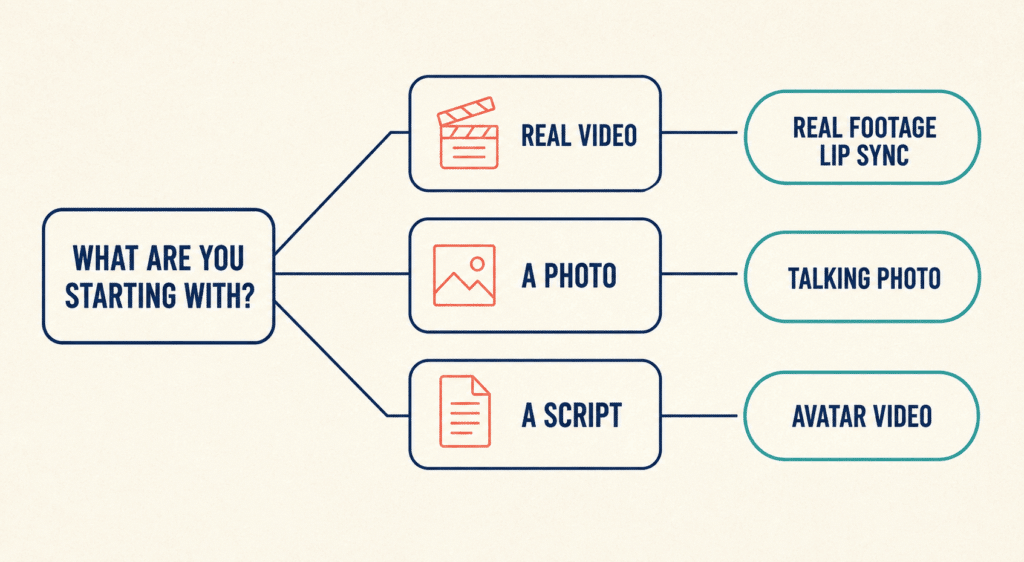
| If you have | You need | Look at |
|---|---|---|
| Real video of a person speaking | Real-footage lip sync | Sync.so, Magic Hour |
| A still photograph or illustration | Talking-photo animation | Hedra, D-ID |
| Only a script, no footage | AI avatar video | HeyGen, Synthesia, D-ID |
| A creative project with several steps | Multi-model studio | Higgsfield |
| High volume and engineering time | Open-source models | LatentSync, Wav2Lip |
Nearly every disappointing result traces back to using a tool from the wrong row. The rest of this guide works through each of them.
Real Footage: Changing What Someone Already Said
This is the hardest of the three problems and has the fewest genuinely good options. The model has to preserve the existing lighting, head motion, skin texture and camera movement while rebuilding the mouth. Avatar platforms tend to struggle here because they were optimized for faces they generated themselves.
Sync.so
Sync.so is purpose-built for this one job. It works on real recorded video, is language-agnostic by design, offers a free tier, and is priced for programmatic use rather than monthly editing. As with every tool here, test your specific target language rather than trusting the coverage claim. If you need a lip-sync API rather than a browser tool, this is the shortest path.
The trade-off is that it is not a creative suite. No editor, no template library, and no hand-holding. For a developer building AI video dubbing into a product, that is a feature. For a marketer producing one video a week, it is friction.
Magic Hour
Magic Hour bundles lip sync with face swap, talking photo, image-to-video and text-to-video in one browser workspace, which suits creators running several transformations on the same asset.
Worth knowing before you commit: independent reviewers in 2026 consistently rate its face swap as one of the stronger consumer-grade options, while describing its lip sync as adequate for social content but inconsistent on complex phonemes and fast speech, with polished brand video often requiring review and selective retakes. That is a reasonable trade if your output is short-form social. It is a poor trade if you are dubbing a keynote.
Its credit model is unusually creator-friendly: paid credits do not expire, which is rare in this category and matters more than headline price if your production is lumpy.
Talking Photos: Making a Still Image Speak
A different problem entirely. No existing mouth to preserve, so the model invents facial motion from scratch.
Hedra
Hedra is the specialist here. You supply an image and audio, and it generates a speaking clip that pays attention to subtle expression and natural head movement, not just mouth motion. It animates any photograph you upload rather than restricting you to a prebuilt avatar library, which makes it useful for characters, illustrations, and digital personalities.
The limits are real. Multilingual dubbing coverage is narrower than the avatar platforms, and there is no editing environment after export, so revisions mean regenerating.
Avatars: When You Have a Script and No Footage
HeyGen
The volume choice for multilingual marketing and corporate video, with wide language coverage and a large avatar library. Reviewers on G2 and Capterra consistently praise avatar realism and multilingual accuracy. The recurring complaint is the credit system: higher-quality avatar renders consume credits faster than expected, unused credits expire monthly, and the free plan’s video cap is widely called too tight to properly evaluate the product before paying.
Synthesia
Frequently omitted from creator-focused roundups and frequently the right answer for enterprises. Built for scripted corporate content, training modules and internal communication, with the broadest language coverage in the category and the compliance posture that procurement teams ask about. If your video will be viewed by ten thousand employees rather than ten thousand strangers, start here.
D-ID
Strong on enterprise localization, real-time conversational avatars and very wide language support. Better suited to organizations producing avatar communication at volume than to an individual creator experimenting with real footage.
Multi-Model Studios
Higgsfield
Rather than a dedicated lip sync product, Higgsfield gives access to several leading video generation models in one subscription alongside a native lip sync module. That suits projects where synchronized speech is one step in a longer chain: generate a character, produce a cinematic shot, animate it, then add dialogue.
The cost is focus. More models means more ways to burn credits on experiments, and a steeper learning curve than a single-purpose tool.
AI Lip Sync Tools Compared
| Tool | Built for | Input | API | Main limitation |
|---|---|---|---|---|
| Sync.so | Real footage, developers | Video + audio | Yes, API-first | No creative interface |
| Magic Hour | Real footage, creator workflows | Video or image + audio | Yes | Lip sync weaker than its face swap |
| Hedra | Talking photos, characters | Image + audio | Yes | No post-export editing |
| HeyGen | Multilingual avatar video | Avatar + script | Yes | Credits expire monthly |
| Synthesia | Enterprise training, scripted content | Avatar + script | Yes | Priced for organizations, not creators |
| D-ID | Enterprise localization, live avatars | Image or avatar + audio | Yes | Heavier than an individual needs |
| Higgsfield | Multi-step creative production | Image or video + prompts | Yes | Easy to burn credits experimenting |
| Wav2Lip / LatentSync | High volume, self-hosted | Video + audio | Self-hosted | Requires engineering capacity |
The “main limitation” column is the one worth reading twice. Every tool here produces good output on easy footage, and the differences only appear at the edges.
Open Source: The Option Most Roundups Skip
If you are producing hundreds of videos a month, the subscription math stops working, and self-hosting starts to.
Wav2Lip is the long-standing free open-source baseline. It is technically demanding to set up, and its output quality is below current commercial models, but it is genuinely free and runs on your own hardware.
LatentSync is the newer diffusion-based open-source option and closes much of the quality gap.
Neither is a realistic choice without engineering capacity. Both are worth pricing against a Business-tier subscription if your volume is high, because the break-even arrives faster than most teams assume. Budget for GPU costs and someone’s ongoing time, not just the zero license fee.
What the Free Tiers Actually Give You
“Free plan available” appears in every comparison table and means almost nothing. What matters is whether the free tier produces something you could publish.
Three questions to ask before signing up:
- Is the output watermarked? Most are. Some remove the watermark only on annual plans.
- How many seconds do you actually get? Free credit allocations in this category commonly translate to well under a minute of video in total, not per month.
- What resolution? Free tiers frequently cap output well below what any platform will accept for paid distribution.
Magic Hour’s free plan, for example, provides a fixed starter credit allocation that works out to roughly seventeen seconds of video at 576 pixels. That is enough to evaluate the tool and not enough to publish anything. Reporting on whether that output carries a watermark is inconsistent, so check on the day you sign up rather than trusting any comparison article, including this one.
Treat every free tier as an evaluation licence rather than a production tier, and budget accordingly.
What You Now Have to Disclose When You Publish
This is the part most comparison articles have not caught up with, and it applies to output from every tool above.
The EU AI Act’s transparency obligations became applicable on 2 August 2026. Lip sync output falls squarely within the Act’s definition of a deepfake, and the trigger is broader than people expect: content that looks or sounds like a real person must be labelled even where there was no intent to deceive and even where no actual individual is depicted. A synthetic presenter who merely looks plausibly human is in scope.
The duties split in two, and this distinction catches people out:
- Providers of the AI system must apply machine-readable marking so the content can be detected as synthetic.
- Deployers, meaning you, must give the audience a clear and perceivable disclosure. Relying on the provider’s embedded watermark does not discharge your obligation.
Penalties reach EUR 15 million or 3% of worldwide annual turnover. The obligations bind any business serving EU users regardless of where that business is established, so a US or UK marketing team is not outside them. Unlike most of the AI Act, these duties apply to in-scope systems regardless of when they reached the market, though a grace period on the provider marking duty runs to December 2026 for systems placed on the market before 2 August 2026. Content published before that date does not require retroactive labelling, though the Commission encourages it.
The primary source is short and worth reading directly rather than in summary: the European Commission’s FAQ on the Article 50 transparency obligations sets out scope, exceptions and enforcement. There is also a voluntary Code of Practice on Transparency of AI-Generated Content, which the Commission has confirmed is an adequate way to demonstrate compliance.
Consent is a separate question. The AI Act governs disclosure, not permission. Putting new dialogue in a real person’s mouth raises publicity rights, contractual and in some US states statutory issues that no label resolves. If the face belongs to an employee, a client, or talent hired under a contract written before generative video existed, get written consent that covers synthetic modification specifically. A standard shoot release usually does not.
A Twenty-Minute Test That Beats Any Comparison Table
Every tool looks excellent in its own demo reel, because demo reels are assembled from the footage the model handles best. The only reliable evaluation is running your own material through several tools.
Prepare three clips of ten to fifteen seconds each:
- The easy case. Front-facing, minimal head movement, good light, clear unhurried speech. Every tool should pass. If one does not, eliminate it immediately.
- The realistic case. Whatever your actual content looks like. Ordinary room lighting, natural gestures, normal speaking pace.
- The hard case. Fast delivery, a partial profile turn, or a phrase dense in plosives and fricatives. This is where AI lip sync accuracy differences become visible, because models fail most obviously on complex phonemes and rapid speech.
Then score each output on five things:
- Consonant accuracy. Watch the mouth specifically on B, P, M and F. Vowels are easy; consonants are where models cheat.
- Whether the jaw moves independently of the lips, or the whole lower face moves as one unit.
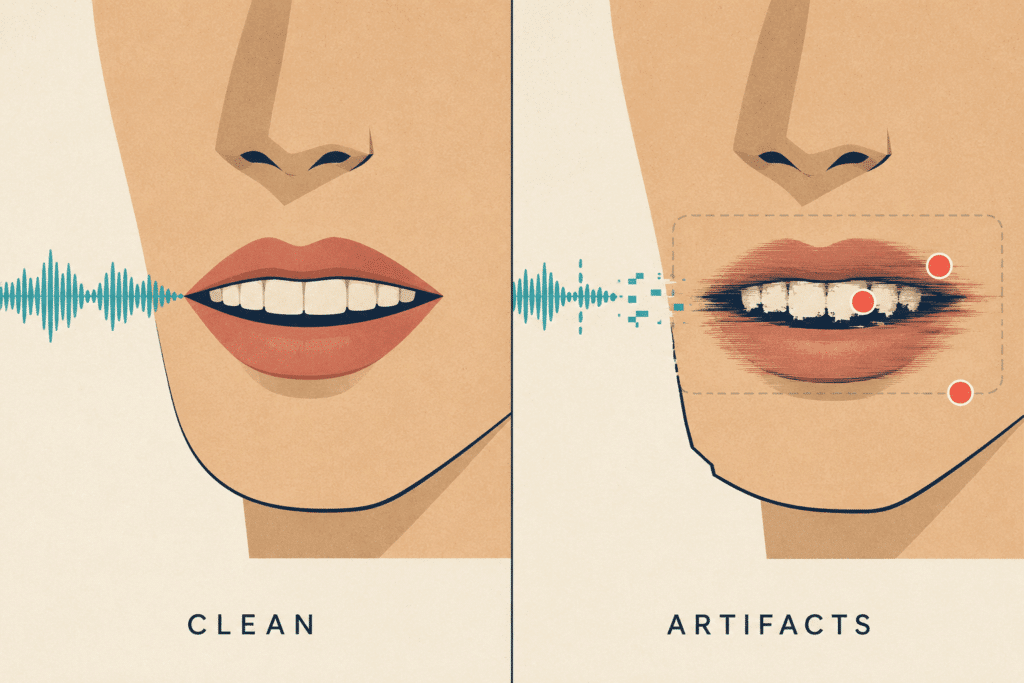
- Teeth. Flickering or inconsistent teeth are the most common giveaway.
- Whether the sync drifts over the clip’s duration.
- Edge stability where the generated mouth region meets the original footage.
Run all three clips through two or three candidates before paying for anything. If you want a browser-based starting point that requires no installation, a free ai lip sync workflow lets you complete this test in an afternoon without committing to a subscription.
The result of this exercise is frequently that no single tool wins outright, and that is useful information. Many teams end up using one product for real footage and another for talking photos.
Where AI Lip Sync Still Breaks
Being specific about failure modes is more useful than another feature list. In practice, output degrades on:
- Extreme angles. Anything past a three-quarter turn.
- Motion blur. Handheld footage and fast pans give the model less to work with.
- Occlusion. Hands near the face, microphones, facial hair over the mouth, glasses catching light.
- Multiple speakers in frame. Most tools handle one face reliably and degrade with more.
- Whispering, shouting and singing. Models are trained overwhelmingly on ordinary conversational speech.
- Low-resource languages. A tool advertising a hundred languages was not trained equally on all hundred. Test the language you actually need.
Source video quality matters roughly as much as model choice, and it is the variable you control.
When AI Dubbing Pays For Itself
The economics only work above a certain volume, and it is worth calculating rather than assuming.
Traditional localization means a reshoot, a voice artist, or a subtitle compromise per market. AI video localization replaces that with one recording and a per-render cost. The break-even arrives quickly for anyone producing creative variants at scale, which is why this is showing up in performance marketing rather than in brand film. If you are already measuring what it costs to acquire a B2B customer, the relevant number is cost per tested creative variant, not cost per finished video.
Where it does not pay: single hero assets, anything with legal or regulatory copy, and any video where a visible artifact would damage the brand more than the saving is worth.
For smaller teams, the sequencing matters more than the tooling. Video variants are a distribution tactic, and they underperform when bolted onto a plan that has not settled its channels first, which is the same failure pattern that shows up when SMEs build a digital marketing strategy around tools rather than around demand.
Nobody Should Publish This Output Unreviewed
Every platform in this category produces occasional artifacts that a human notices instantly and a model does not: a flicker on a hard consonant, a mouth that stays slightly open between words, a jaw that moves half a frame late.
Build a review step into the workflow and give it a checklist, not a vibe. Watch at full resolution, watch with sound off (artifacts are more visible without audio pulling your attention), and watch the mouth specifically, not the whole face. This is the same principle that applies wherever generative systems produce production output, which is that AI-powered work still needs human expertise applied at the point of review rather than trusted at the point of generation.
Budget roughly one review pass per finished minute. It is cheaper than a recall.
Does AI-Generated Video Hurt Your Search Visibility?
A reasonable worry, and the answer is more specific than the question.
Google does not penalize content for being AI-assisted. It penalizes content produced at scale primarily to manipulate rankings rather than to help people. A dubbed product demo that genuinely serves a Spanish-speaking audience is not in that category. Four hundred near-identical avatar videos targeting keyword variations are.
The practical risk is different and more interesting. As search shifts toward generated answers, the sources that get cited are the ones offering something a model cannot synthesise from everything else in the index. Video content that exists only to occupy a keyword contributes nothing on that axis. If AI video is part of a wider visibility plan, the mechanics of ranking inside AI Overviews are worth understanding before you scale production, because the multiplier only helps if the underlying asset was worth multiplying.
Frequently Asked Questions About AI Lip Sync Generators
There is no single answer, because the tools solve three different problems. Sync.so and Magic Hour are the two to look at for real recorded footage, with Sync.so the stronger choice if lip sync accuracy is the priority. Hedra leads for animating still photographs. HeyGen and Synthesia lead for script-to-avatar video. Pick the row that matches your source material first, then compare within it.
Most platforms offer a free tier, but almost all of them are evaluation licenses rather than production tiers. Expect watermarks, resolution caps and total output measured in seconds rather than minutes. Free tiers are genuinely useful for running the test protocol above and rarely sufficient for publishing.
Sync.so is purpose-built for it and is the natural choice if you want lip sync as an API. Magic Hour is the stronger browser-based option if you also need face swap and image-to-video in the same workspace, though independent reviewers describe its lip sync as inconsistent with fast speech and complex phonemes.
If your audience includes EU viewers, yes. Since 2 August 2026, the EU AI Act requires deployers to clearly and perceptibly disclose deepfake content, including lip-sync output depicting a real-looking person, whether or not deception was intended. Penalties reach EUR 15 million or 3% of worldwide turnover. Rules elsewhere vary, and several US states have their own likeness statutes.
No. Provider marking and deployer disclosure are separate obligations under Article 50. The embedded mark satisfies the provider’s duty, not yours.
Almost always. Disclosure law and likeness law are different things, and a labeled deepfake of someone who did not consent is still a problem. Get written consent that explicitly covers synthetic modification. Contracts signed before generative video existed usually do not cover it.
Most platforms advertise wide language support, and you should treat coverage claims as marketing rather than specification. A tool trained predominantly on English will produce visibly weaker mouth shapes in languages with different phoneme inventories. Test the specific language you need before committing to a localization program.
Lip sync synchronizes an existing face, from video or a photograph, to supplied audio. An avatar platform generates the presenter and the speech, usually from a script. If you already have footage of a real person, an avatar tool solves a problem you don’t have.
Only with engineering capacity. Wav2Lip is free and mature but technically demanding and behind current commercial quality. LatentSync is the newer diffusion-based option and closes much of the gap. Both make sense at high volume where subscription costs compound, and neither is realistic for a team without someone to maintain them.
For social content, localization and marketing variants, generally yes, with a human review pass. For hero brand assets, regulated content, or anything where a visible artifact would be costly, the technology is close but not yet invisible. Test on your own hardest footage rather than on a demo reel.
The Short Version
Match the tool to your source material, and most of the confusion in this category disappears. Real footage points to Sync.so or Magic Hour. Photographs point to Hedra. Scripts point to HeyGen or Synthesia. Volume points to open source. Multi-step creative work points to Higgsfield.
Then do two things before you publish anything. Run your own hardest clip through two or three candidates rather than trusting a comparison table, including this one. Settle your disclosure and consent position before the first render, not after the campaign is live, because that is now a legal question in Europe rather than a stylistic one.
Tools, pricing, and free-tier terms in this category change every few weeks. Figures here were checked in August 2026 and should be verified against each vendor’s current pricing page before purchase.
